Book an Appointment
Call Coral Springs Computer Repair Service at 754-241-1655
                   

(754) 241-1655

*


Coral Springs Computer Repair Service has provided the best mobile computer repair in Coral Springs, FL and the greater Miami Metropolitan Area since 1999. The term "mobile computer repair" means we come to you to resolve all your computer problems.

We repair laptops, desktops, PCs and Apple computers. One of our highly qualified staff will come to you, often the same day, to take care of all your repair needs.

Why not use the #1 rated company for computer repair in Coral Springs, FL?

Computer Repair 4.9 / 5 stars from 324 reviews
Why use a computer tech when you can have a Coral Springs based Computer Engineer? Mon-Sun 8:00am - 8:00pm

Call us at (754) 241-1655

Text us at (754) 241-1655

Email us your questions

Book an Appointment

"Great service and friendly staff. Got my computer fixed same day, thank you!"
Coral Springs Computer Repair Service 5 / 5 stars
"Dustin, the technician, did an awesome job. He kept me informed along the job. Techs like Dustin, make me a customer for life. "
Coral Springs Computer Repair Service 5 / 5 stars
"Wonderful service, from the initial phone call and scheduling, very upfront on costs. The tech showed up on time, with a 15 min courtesy call, he was professional, knowledgeable and gave great advice. He replaced my hard drive and got me back up and running. I would recommend this service. I chose it because of all the positive online reviews and I was not disappointed."
Coral Springs Computer Repair Service 5 / 5 stars
"Josh was again superb. He reinstalled my HP printer software and now I can scan once again. Much thanks for your service."
Coral Springs Computer Repair Service 5 / 5 stars
"Fast service! Fixed all of my computer problems and was very helpful in making suggestions on products I needed. He arrived on time and was professional. Overall a very pleasant experience and I will call again!"
Coral Springs Computer Repair Service 5 / 5 stars

Who is Coral Springs Computer Repair Service?

Coral Springs Computer Repair Service is owned by Matt Karls, an Electrical Engineer and a Computer Systems Engineer. We are a team of computer professionals focused on Service and quality, all our work is guaranteed.

If you have any computer, technology or IT problem in Coral Springs, FL we can fix it. We have been performing computer repair in Coral Springs full time since 1999. Feel free to give us a call or text us at (754) 241-1655.

Coral Springs Computer Repair Service's Computer Engineer

What is your Service Area for on-site Computer Repair?

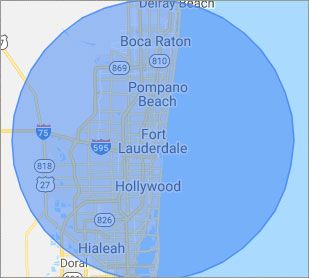
Our primary on-site mobile service areas include the greater Miami Metropolitan Area as well as the Tampa, Orlando and Jacksonville metro areas.

We provide remote and mobile computer repair in Coral Springs, Fort Lauderdale, Hialeah, Hollywood, Pembroke Pines, Miami, Miramar, Miami Gardens, Pompano Beach, West Palm Beach, Davie, Boca Raton, Sunrise, Plantation, Miami Beach, Deerfield Beach, Boynton Beach, Weston and Coral Gables.

Our on-site Computer Service Area

What should someone expect that hires you for Computer Service?

Our mission is to fully resolve your computer problems quickly and affordably. If you want a Computer Engineer that can fix all of your computer problems instead of a computer tech, a computer geek, a technician or a computer guy that can only fix some of your problems; call us at (754) 241-1655.  

What types of Computer Services do you perform?

We service businesses and business clients in their homes, including:
 
  • Diagnose / repair hardware or software problems
  • Spyware, malware, trojan and virus removal
  • Setup wireless and small business networks
  • Laptop repair, PC repair and Apple repair
  • Hard drive data recovery

Coral Springs Computer Repair Service Contact Information

Coral Springs Computer Repair Service
Coral Springs, FL 33065
(754) 241-1655

Coral Springs Computer Repair Service is a Karls Technology company

* *
*
*
*
  *
* *


*
*
* * * * * * * * * * * * * * *
4.9 / 5 stars from 324 reviews

"Great service and easy to work with!!!"

Coral Springs Computer Repair Service 5 / 5 stars

"Anthony was very helpful in each step of the process, very professional."

Coral Springs Computer Repair Service 5 / 5 stars

"My tech was great and appeared knowledgeable, I won't hesitate to contact again and I would highly recommend."

Coral Springs Computer Repair Service 5 / 5 stars

"Taylor worked through 6 PC systems with great ease. Very satisfied with his skills and his help servicing our systems."

Coral Springs Computer Repair Service 5 / 5 stars
Best Antivirus Software of 2026: The Ultimate Guide to Cybersecurity Brands

In 2026, the digital threat landscape has shifted. We are no longer just fighting simple viruses; we are defending against AI-generated phishing, sophisticated ransomware-as-a-service, and complex identity theft. Choosing the right antivirus brand is no longer optional—it is the foundation of your digital life. At Karls Technology, we’ve analyzed the top-performing security suites of the […] The post Best Antivirus Software of 2026: The Ultimate Guide to Cybersecurity Brands appeared first on Computer Repair Blog.

Network Card Disconnects You from Wi-Fi

If your computer keeps disconnecting from your Wi-Fi network, but other devices can connect just fine, it may be that the network card in your computer is not receiving enough power. A network card is a piece of hardware that connects computers in a network. Windows includes an energy-saving mode that immediately lowers network card […] The post Network Card Disconnects You from Wi-Fi appeared first on Computer Repair Blog.

Disabling Game Mode on PC

By switching to “Game Mode,” your PC will be set up for maximum gaming performance. While this is fantastic during gameplay, it may cause your computer to run more slowly during other activities. You can improve your computer’s speed by disabling Game Mode. Even if you’ve never played a video game in your life, there’s […] The post Disabling Game Mode on PC appeared first on Computer Repair Blog.

Check if Website is Safe

You can inquire as to the security of a website using Google if you have doubts as to whether or not it is dangerous. According to famous tech company, Google’s unified approach to security, dubbed “Safe Browsing,” enables safer Internet experiences for users everywhere. To check to see if the website you’re wishing to visit […] The post Check if Website is Safe appeared first on Computer Repair Blog.

Breach on Edge Browser

A new investigation has shown that there is a significant data breach problem with Microsoft Edge that impacts millions of internet users on a daily basis without their knowledge. The security firm Otto’s discovered, as reported by Rick’s Daily Tips, that the “Enhanced Spellcheck” tool in Chrome and the “Microsoft Editor: Spelling & Grammar Checker” […] The post Breach on Edge Browser appeared first on Computer Repair Blog.

Performance Boost by Disabling Memory Integrity

Consumers using Intel’s discrete graphics processor units for personal computers have seen a noticeable performance boost after disabling certain security safeguards. Disabling Windows 11’s Memory Integrity setting is required to increase performance. However, it’s important to remember that, according to Microsoft, Memory Integrity ensures that only trustworthy drivers are installed into the operating system, making […] The post Performance Boost by Disabling Memory Integrity appeared first on Computer Repair Blog.

How to Hide Documents on your PC

There are instances when we have sensitive files that we’d prefer to keep hidden from prying eyes. There is an uncomplicated method is effective and can be used in such a scenario. Here’s how to hide documents: Right-click on the document Go to Properties Click the Hidden option and hit apply If you ever have […] The post How to Hide Documents on your PC appeared first on Computer Repair Blog.

Solid-State Buttons on Upcoming iPhones? Maybe!

Next year, the volume and power buttons on the iPhone 15 Pro and Pro Max might be changed to solid-state buttons instead of being able to be pressed down. The Home button of the iPhone 7 was the first to be made entirely out of a solid-state component. This allows thumbprints to be the way […] The post Solid-State Buttons on Upcoming iPhones? Maybe! appeared first on Computer Repair Blog.

YouTube Is Getting a Facelift

Several updates by YouTube have been released to desktop and mobile video player today, all of which are designed to improve the player’s aesthetics and performance. According to MacRumors, YouTube announced today that their dark theme will be getting an upgrade. Along with that, the video player will be updated with buttons and different colors. […] The post YouTube Is Getting a Facelift appeared first on Computer Repair Blog.

Microsoft Fixes Bug on Windows 10

Microsoft has fixed an error that could cause the taskbar and desktop to disappear on Windows 10 computers. The same problem has been attributed by the corporation to the consumers’ gadgets freezing and not responding to input, according to Bleeping Computer. They also share that the affected versions are 20H2, 21H1, 21H2, and 22H2. Make […] The post Microsoft Fixes Bug on Windows 10 appeared first on Computer Repair Blog.